
Table of Contents
- What You’ll Build
- The Basic Idea Behind an AI Agent
- Before You Start
- Step 1: Create Your Project
- Step 2: Install the Agents SDK
- Step 3: Connect Your OpenAI API Key
- Step 4: Create First AI Agent
- Step 5: Run Your Agent
- Step 6: Give Your Agent Its First Tool
- Step 7: Give Your Agent a Clear Job
- Step 8: Test It With Different Requests
- Example: Turn It Into a Research Agent
- What Beginners Usually Get Wrong
- Conclusion
- Artificial Recap
- FAQs
What if you ask AI to perform an action and, instead of writing a prompt, the AI does the work on its on? That’s the advantage the AI agent provides us.
The good news: You don’t need to create an absolute AI system to begin with. You can make the AI Agent for your personal use with the simple knowledge of programming. The guide below will help you with this.
What You’ll Build
Before getting started, here’s the objective:
You will develop an easy AI study buddy that is able to comprehend a user’s request and respond following a given set of instructions.
Later, you can turn the same basic idea into an agent for:
- Customer support
- Research
- Content creation
- Productivity
- Data analysis
- Business automation
- Personal tasks
The important thing is to start small.
A useful first agent doesn’t need to do everything. It needs to do one job well.
The Basic Idea Behind an AI Agent
A normal chatbot generally follows a simple pattern:
You ask → AI responds.
An AI agent can follow a more flexible workflow:
You give it a goal → AI determines what to do → AI uses available tools → AI produces a result.
An agent typically combines three important components:
Model + Instructions + Tools
The AI functions in the model, the instructions give it its role and define its behavior, and the tools enable it to interact with information or take some sort of action. So long as you have a good grasp of these three parts, the rest of the process will be simpler.
Before You Start
For this beginner project, you’ll need:
- Python installed on your computer
- An OpenAI API key
- Basic knowledge of running Python programs
- The OpenAI Agents SDK
- VS Code or other code editor
Step 1: Create Your Project
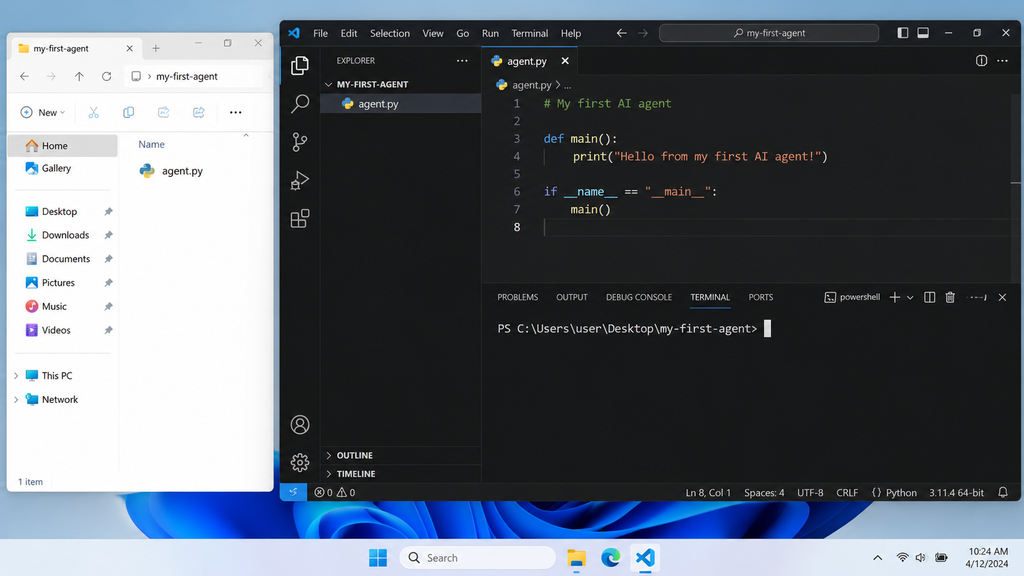
- Start by creating a new folder for your AI agent.
- You can call it something simple such as “my-first-agent”
- In this folder, you will eventually develop your agent’s Python file.
- Having the project as a separate folder helps to manage the files, dependencies, and future improvements.
SCREENSHOT
Step 2: Install the Agents SDK
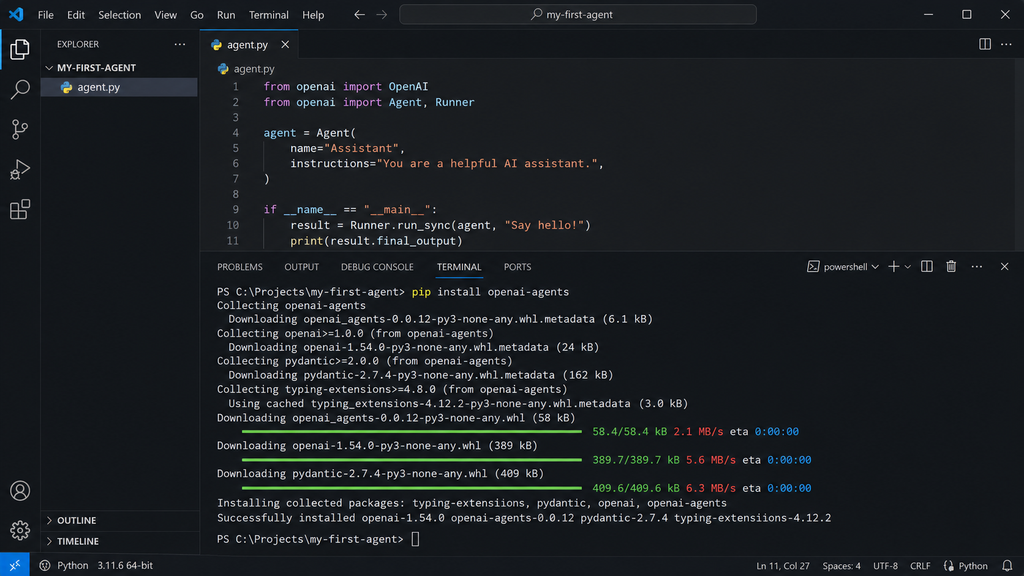
Your next step is to install the OpenAI Agents SDK.
The SDK includes tools and a framework to define an agent and to execute it.
It is available to install in the terminal with the Python package manager
SCREENSHOT
Step 3: Connect Your OpenAI API Key
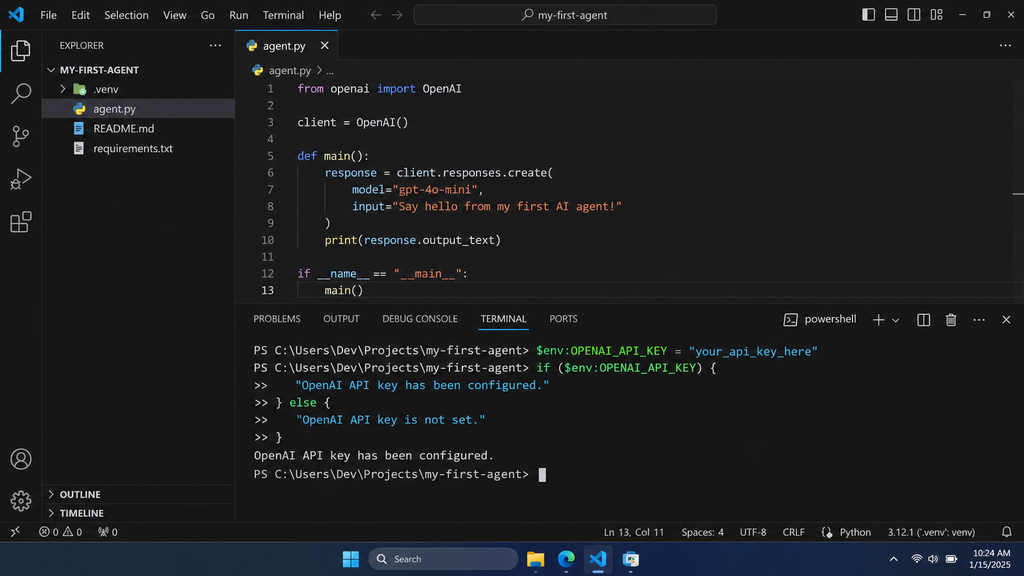
- Integrate your OpenAI API key with your agent, enabling it to utilize an AI model.
- You need to store the code in the front-end folder and not in the source.
- In the future, we will upload the project to GitHub, so make the folder and store other data carefully.
SCREENSHOT
Step 4: Create First AI Agent
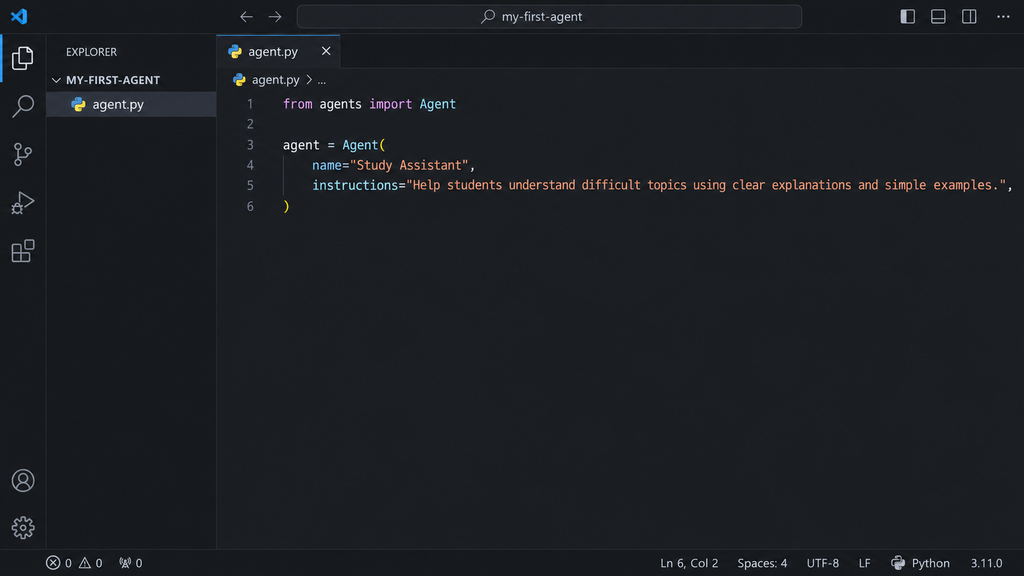
Now you’re ready to create the agent itself.
This is where you define the agent’s:
- Name
- Instructions
- Role
- Expected behavior
In this instance, let’s make a basic Study Assistant.
The instructions inform the AI what to do, which is to explain complicated topics with simple explanations and examples.
SCREENSHOT
Step 5: Run Your Agent
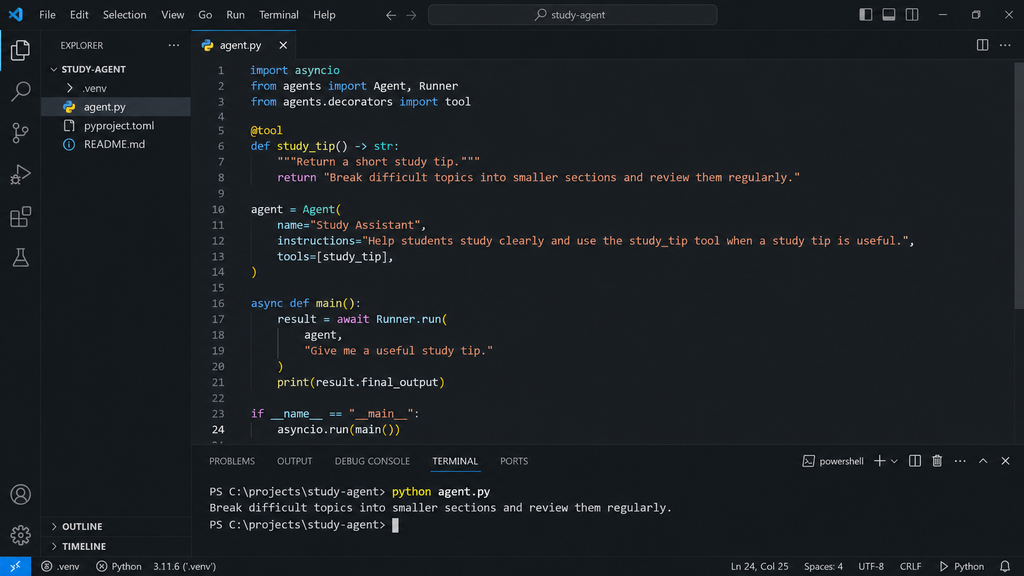
- You won’t be able to simply create the agent; you need to run it.
- The agent runner performs the action and returns the results of the action to you.
- For your first test, give the agent a simple instruction such as “Explain photosynthesis to a beginner.”
- This is a good first test because the request is simple and easy to evaluate.
SCREENSHOT
What Just Happened?
- Although the example is small, several things happened behind the scenes.
- You defined an agent and gave it instructions.
- Then you gave the agent a task.
- The agent executed the request with the provided AI model and sent back a response.
- It acts a bit like a chatbot at this juncture.
- The real difference becomes more obvious when you give your agent tools.
Step 6: Give Your Agent Its First Tool
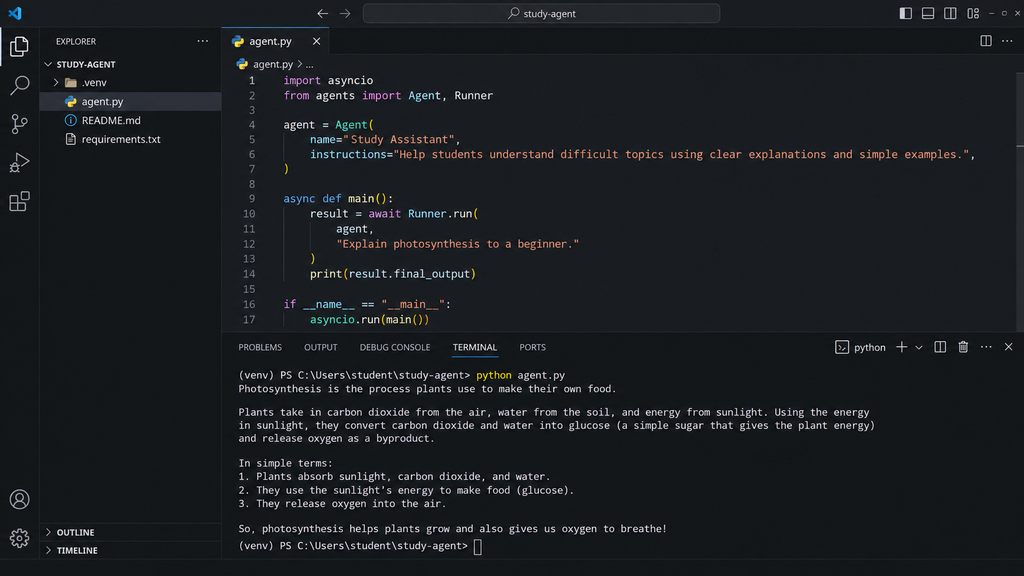
Tools are what allow an AI agent to do more than simply generate text.
A tool can give the agent access to information or allow it to perform an action.
For example, an agent could potentially use tools to:
- Search information
- Access a database
- Read files
- Call an API
- Calculate information
- Retrieve customer records
- Perform an external action
For our example, we’ll give the study assistant a simple tool that provides a study tip.
SCREENSHOT
Step 7: Give Your Agent a Clear Job
- Now that your agent can use a tool, give it a specific responsibility.
- Avoid instructions such as “You are a helpful AI assistant.”
- That’s too broad.
- Instead, give it a clear role.
Example:
“A study assistant to assist students in practicing a subject, ask one question at a time, clarify wrong answers, and tailor the level of difficulty according to the student’s performance. “
A good agent instruction should explain:
- What the agent is
- What it should accomplish
- How it should communicate
- When it should use its tools
- What it should avoid doing
Step 8: Test It With Different Requests
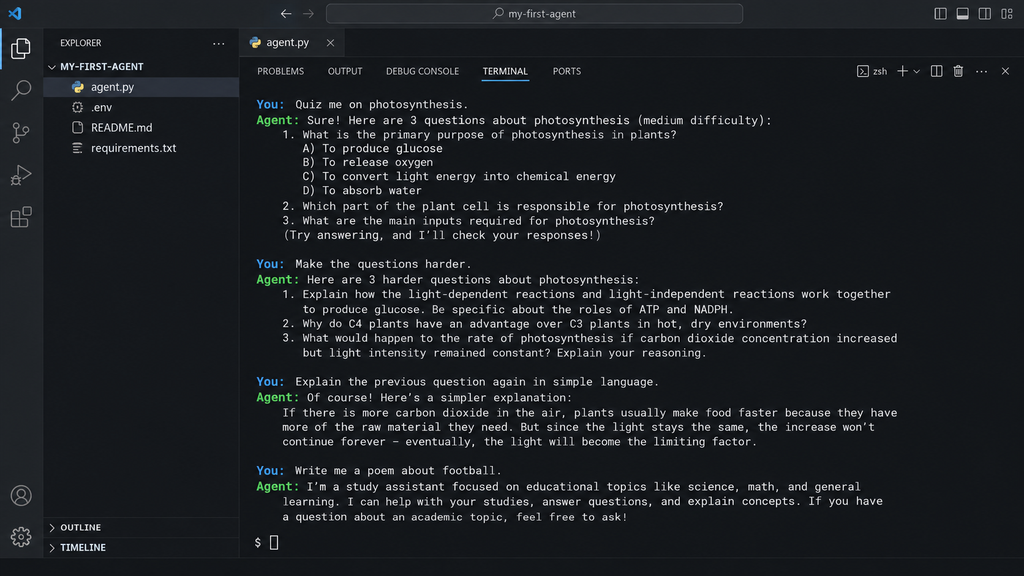
Don’t stop after your first successful response. A good AI agent needs to be tested with different kinds of requests.
Try something straightforward:
“Quiz me on photosynthesis.”
Then test a different request:
“Make the questions harder.”
You can also test whether it understands follow-up requests:
“Explain the previous question again in simple language.”
example:
“Write me a poem about football.”
This can help you determine whether your instructions are strong enough to keep the agent focused.
SCREENSHOT
Example: Turn It Into a Research Agent
After you create your basic agent, you can begin to pursue real-life applications.
Envision your first project as a research assistant. Instead of simply answering questions from its existing knowledge, the agent could eventually be connected to tools that allow it to gather and organize information.
A possible workflow could look like this:
Topic → Research → Gather Information → Organize Findings → Final Report
This type of agent could be useful for:
- Students
- Researchers
- Writers
- Businesses
- Content teams
- Developers
What Beginners Usually Get Wrong
- Trying to Build Too Much
- The worst error one can make is to begin with a very large plan. Don’t attempt to create a personal assistant for your email, calendar, shopping, research, finances, and business operations within 1 day. Do a little bit at a time.
- Adding Too Many Tools
- More tools don’t automatically make an agent better. Every additional tool can introduce another possible failure point. Start with one tool and after some time, add others when you need them.
- Giving unclear instructions
- Your agent may have a fuzzy job description, and that could make him or her act in a different way. Use clear instructions and direction as to what the agent should do and what the agent should return.
- Not Testing Edge Cases
- An agent that works perfectly with one example may behave differently with another. Test normal requests, unusual requests, incomplete requests, and requests outside the agent’s intended role.
Conclusion
You don’t have to build an AI agent that uses dozens of tools and has some complicated automation to get your first one up and running. The best way to begin is to have one problem to solve and one workflow to utilize. Assign a task to your agent, give explicit directions, match the tool with the task, and practice it with actual tasks. After it behaves reliably, you can add APIs, memory, guardrails, and more agents to it.
It’s all about taking little steps, making them actionable and useful, and making them better over time. Do not be afraid to not have the best AI agent initially – it needs to be introduced as a solution to a problem. So, don’t wait to learn about all advanced AI concepts. Choose a repetitive action that you perform in your everyday life, make it an easy AI workflow, and create your first agent. This little test could be the launching point for greater and greater levels of automation.

Artificial Recap
How to Build Your First AI Agent (Full Guide)
FAQs
1. Do you need high programming skills to create an AI agent?
No, you can make an AI agent by just using basic programming skills. No need for higher knowledge in machine learning or data systems.
2. How AI Agent is different from a simple chatbot?
Chatbots are typically made to reply to messages. An AI agent can complete a goal, use tools, and can do multiple tasks for you.
3. Can the AI agent be given access to tools that are not part of the system?
Yes. Depending on the construction, an agent can be attached to a function, API, database, file, search, and other external tools.
4. Will multiple agents be used instead of the first AI agent?
Typically, it’s easier to start with one agent. When there are multiple tasks in the workflow, each needing to be handled by a different agent, multiple agents come in very handy.