
There are numerous AI tools that students use today, and when picking the right one, it can be difficult. Whether you need to clarify complex ideas, recall information, or summarize notes, whether you are studying for a test, completing homework, or even tackling math problems, the best AI tools for students will help you to make your daily schoolwork easier and more efficient. But not all tools are created to serve the same purpose.
We have chosen the 7 best AI tools for students because they offer a good balance of practical features, ease of use, do not require payment, and are suitable for certain types of study tasks. From helping with exam preparation to tackling homework tasks, from conducting research to gaining a deeper understanding, these AI-powered tools are meant to enhance, not supplant, your comprehension and critical thinking abilities when it comes to studying.
1. ChatGPT
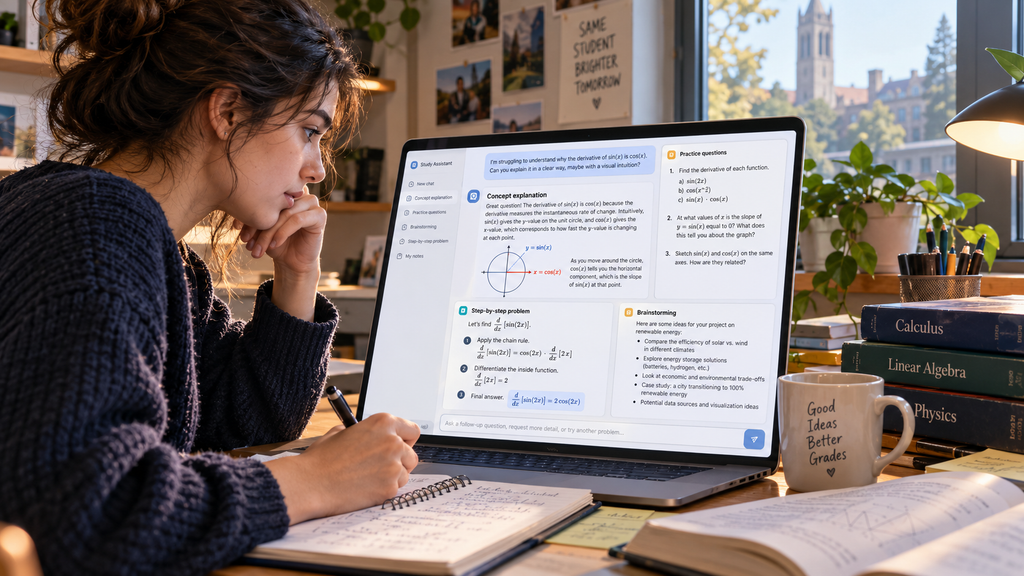
ChatGPT is OpenAI’s all-purpose AI chatbot. For students, it is not really an online search tool, but more like a study buddy you can converse with about anything you explain, quiz, or ask to brainstorm with. It can, indeed, do a lot- it can take any topic that’s too complicated and explain it in a simpler manner, solve a problem by giving each step a specific prompt, and even suggest practice questions for any subject you’re not so good at.
Key features
- Study Mode where you can walk through a concept rather than just give the answer
- When reviewing notes, pages in textbooks, or problem sets in files, users can upload files and images.
- A memory function used to recall your preferences, courses, and learning goals from session to session
- Organize a project to ensure distinct discussion of subjects or assignments in separate threads
2. Perplexity AI

An AI Answer engine that crawls the real-world web and includes numbers in its answers. When writing a research paper, the items that count more are the citation trail instead of the answer itself. Perplexity enables you to follow up every claim to its source, making it much easier to confirm any information before it gets written on paper.
Key features
- Citations are numbered and can be clicked on, and lead directly to the source.
- Narrow search results to a particular kind of source (Academic papers, Reddit, YouTube, Wolfram Alpha, etc.)
- Collections to research by project, class, and/or topic.
- Upload questions only from your own files, in addition to exploration on the web.
- Pro Search simplifies and clarifies complex queries with questions before answering
3. NotebookLM
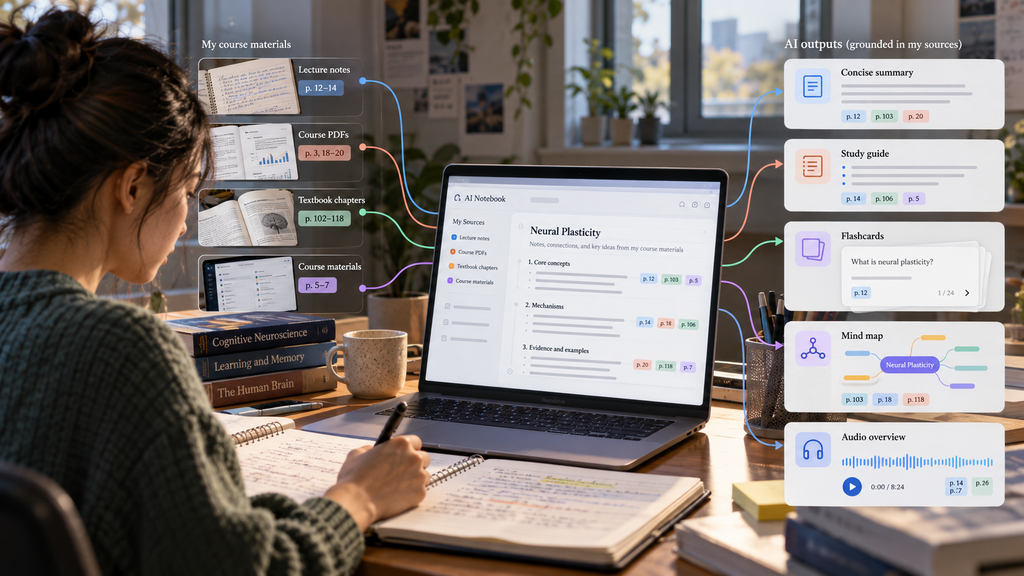
NotebookLM is Google’s AI research assistant, which can answer with information only from your documents, such as reading texts, lecture notes, PDF files, or your own notes. It is highly unlikely to fabricate facts that aren’t in your course syllabus because it bases all of its answers on your real syllabus. It also helps you convert dense reading into digestible forms: summarizing, delivering overviews that you can listen to as audio, creating flashcards on the spot, and letting you make mind maps from your reading.
Key features
- Use PDF, Google Docs, slides, websites, and even YouTube videos as the sources (up to 50 for one notebook).
- Audio Overviews that convert your content into a podcast conversation between two AI hosts, ideal for checking out on the road
- In-line citations that indicate exactly which document and section each answer is from.
- Make as many as 100 notebooks for up to a whole semester of courses on the free plan.
- Suggested questions to use as a tool to explore relationships in the information you’ve identified between the sources that you may not have noticed.
4. Grammarly

Grammarly is an AI writing assistant that can edit your essay, email or homework for grammar and spelling mistakes, unclear and tone issues. It lets you know what the actual errors are in your text and helps you consider anything you might do that is unusual in your text (but not in their minds), and recommends modifying your text to make it tighter, stronger and clearer before you submit it, but does not change your ideas.
Key features
- Conditions for changing formality (e.g., between an email to a professor and a formal paper), such as tone detection.
- Integrations and browser extensions that you can use within Google Docs, Word, Gmail, and most online text boxes
- Setting goals that allow establishing audience, formality, domain and intent for context-aware suggestions
- Writing trend parameters (productivity, vocabulary, frequency, patterns of writing errors over time)
5. Quizlet (with Q-Chat)
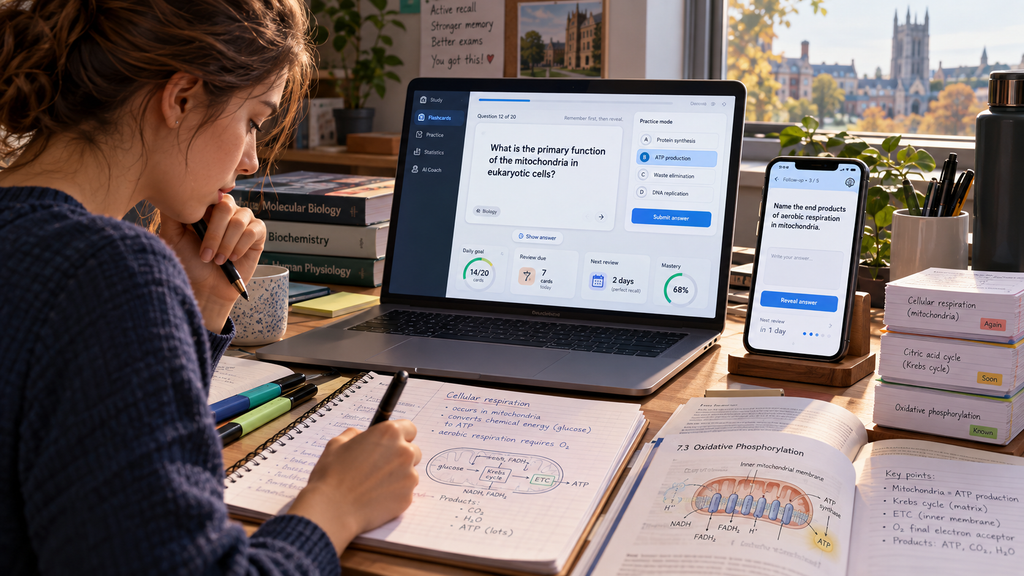
Built-in active recall: Quizlet is a flashcard and study-set platform, plus a new AI tutor functionality (Q-Chat). One of the most robustly evidence-based approaches to learning over time is retrieval practice, or repeated tests or looking back at the material repeatedly; Quizlet is designed not to simply review, but designed around the repeated testing of information.
Key features
- Create your own flashcards, quizzes, and study guides from Magic Notes; just upload your notes or a document and get it all made in an instant!
- Practice games such as Match and Learn mode (spaced repetition games) to eliminate memorization, making it more interesting
- Crafted flashcards and images, multiple-choice, true/false, definition, and term questions that can be customized
- Progress tracking of terms learnt and those that require more practice
- Studying together with collaborative study packets that classmates can add to and study.
6. Photomath
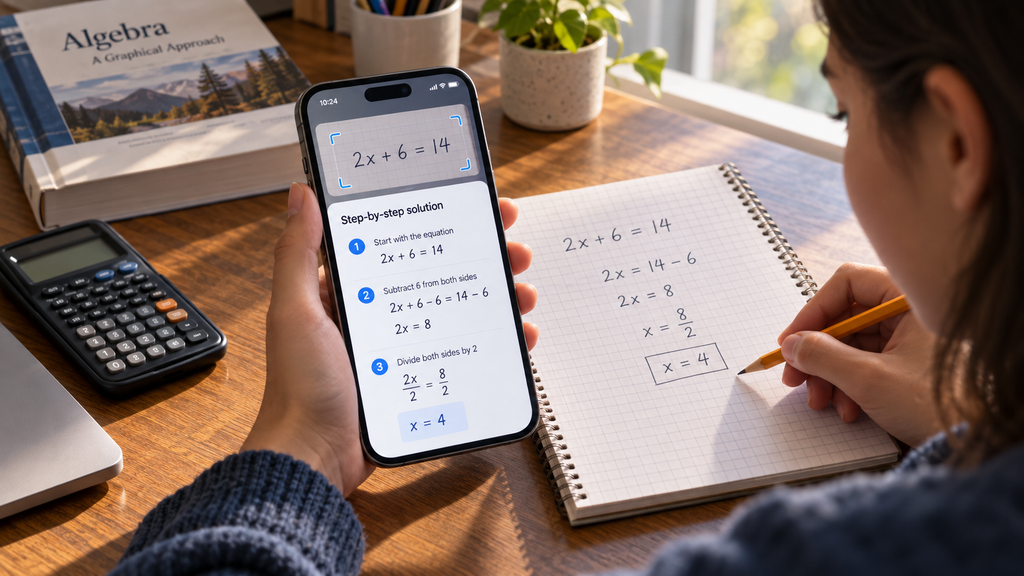
Photomath is a smart app that helps you solve problems that you put on paper; once you take a picture of the problem, it will provide you with an answer, solution, tips, and step-by-step breakdown. Seeing the steps, even when it comes to something as simple as arithmetic homework, is the way you learn the approach, and from basic math to Calculus, Photomath’s step-by-step breakdown is specifically designed to help you do just that.
Key features
- Step-by-step explanation for each answer, instead of just a final number – explains each step in the calculation, allowing you to see how the logic is applied.
- Why it only covers arithmetic to calculus and adds word problems, statistics, and some graphing.
- Different solution techniques for some problems – demonstrating different ways to get to the same answer
- Record and journal problems you’ve scanned for later review and practice
- Having a scientific calculator in the app for further calculation
- Handwriting recognition enabling input of text written by students, not printed text.
7. Otter.ai

Otter.ai is an AI-powered transcription service designed to live capture and transcribe lectures, meetings or even study group sessions and then organize the transcription into concise and searchable notes. It cannot be solved with any chatbot, but it can be solved with it: It handles another problem: The real events of the lecture are captured. Follow along as you listen and have Otter transcribe it, and then later scroll up and down and summarize as necessary.
Key features
- AI summary and automatic action items – produce short summaries of given long lectures which include key points, assignments, and deadlines
- Searchability of transcript; can search by keyword for a particular moment (not possible on audio to find out where the lady spoke about it during a two-hour lecture)
- Use lines to highlight and make comments on important sections during or after transcription
- Class and group folders for sharing with other students or for study groups.
- Automatic punctuation and formatting so that the transcripts are readable, without human intervention.
Comparison Table
| AI Tool | Best For | Free Option | Main Strength | Difficulty |
| ChatGPT | Explaining concepts & brainstorming | Yes (limited) | Flexible, conversational reasoning | Easy |
| Perplexity AI | Cited research | Yes (generous) | Verifiable, sourced answers | Easy |
| NotebookLM | Studying your own material | Yes (generous) | Grounded in your uploaded sources | Easy |
| Grammarly | Polishing writing | Yes (core features) | Catches errors across platforms | Easy |
| Quizlet | Memorization & flashcards | Yes (capped) | Built around active recall | Easy |
| Photomath | Math & STEM problem sets | Yes (basic solutions) | Step-by-step camera solving | Easy |
| Otter.ai | Lecture transcription | Yes (limited minutes) | Accurate or well researched | Easy |
Conclusion
No single AI tool can cover all the needs of the students. ChatGPT and Perplexity handle the bulk of explaining and researching; NotebookLM turns your own course material into study guides without inventing facts; Grammarly catches errors before submission; Quizlet handles memorization through active recall; Photomath walks through math problems step by step; and Otter.ai captures lectures you’d otherwise struggle to keep up with by hand.
If you’re starting from zero, install ChatGPT and Perplexity first — they cover the widest range of everyday tasks. Add the more specialized tools as specific coursework demands them, and keep an eye on your school’s AI policy and each app’s free-tier limits before reaching for your wallet.
FAQs About 7 Best AI Tools for Students in 2026
1. What is the best AI tool for students overall?
ChatGPT is the most flexible starting point for general explaining and brainstorming, but pairing it with a research-focused tool like Perplexity covers more of an actual course load.
2. Are these AI tools free?
All seven of them offer some free tier, but their usefulness is different. For standard student tasks, free versions of NotebookLM and Perplexity are quite promising, while the AI tutor (Q-Chat) by Quizlet comes with a paid subscription.
3. Which AI tool provides the most precise and reliable answers?
Perplexity AI, because it attaches numbered citations to its answers, and NotebookLM, because it answers only from documents you’ve personally uploaded.