What if you could create a beautiful picture from a simple sentence, without knowing how to draw or use professional design programs? AI image generators are making it possible, from visuals provided for blogs of movies to realistic photos of products and imaginative digital art. However, obtaining an impressive and eye-catching image, in line with your ideation, is a different challenge.
Leonardo AI aims to make this easier, offering users a suite of tools to create images, experiment with styles, and edit their outputs all within a single tool. But it’s not actually one of the best AI image generators, is it, or are ChatGPT and Midjourney going to do better?
Let’s dive into the features, image quality, and the free plan of Leonardo AI, along with its pricing and limitations, to determine if it’s worth using.
| Feature | Leonardo AI |
| Best for | Designers, marketers, game artists, content creators, and AI art hobbyists |
| Main strength | Wide range of image models and creative controls |
| Free version | Yes, with daily token limits |
| Paid plans | Essential, Premium, Ultimate, and team plans; pricing can vary by platform and region |
| Ease of use | Beginner-friendly, but advanced controls take time to learn |
| Main limitation | Token-based usage and occasional inconsistency in fine details |
How Does Leonardo AI Work?
Leonardo AI is an application that harnesses the power of generative AI to create visuals from written text prompts or visual references. In the simplest of terms, it just gives you a prompt, then you pick a model and settings, then it gives you images based on what it has learned from some visual data.
As is generally the case, the process is fairly straightforward:
- Make an account and start the image generation tool.
- Enter a description of the picture you wish to get.
- Choose the model, aspect ratio, quantity of images, and style parameters.
- Generate the image.
- Edit it, upscale or use image guidance to make it look better.
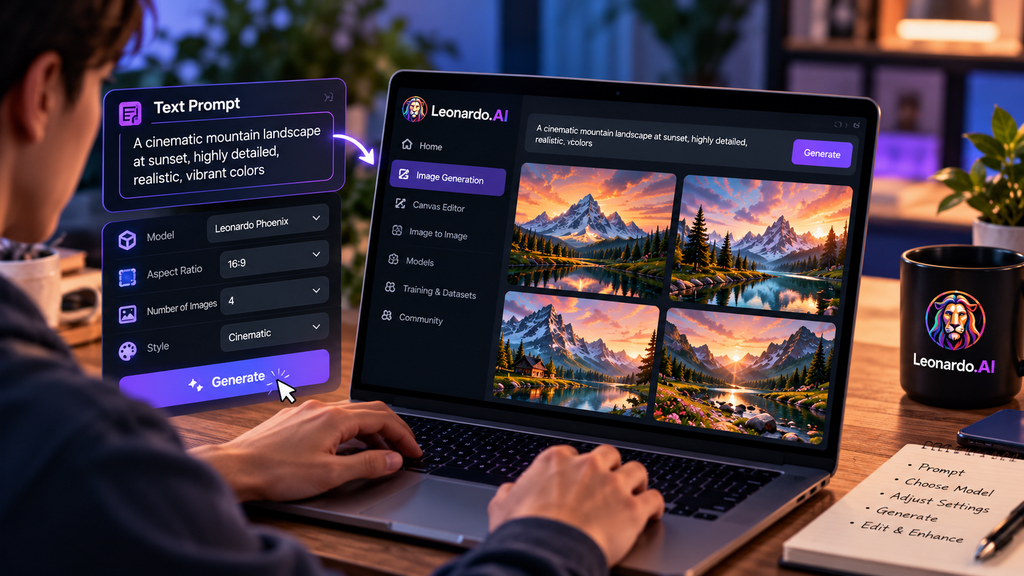
There is a token- or credit-based system in place on the platform. The more complex settings or models can use more tokens in each generation, and the more tokens that are used, the more complex the setting or model. This means it’s necessary to consider usage, particularly in case you create more variations.
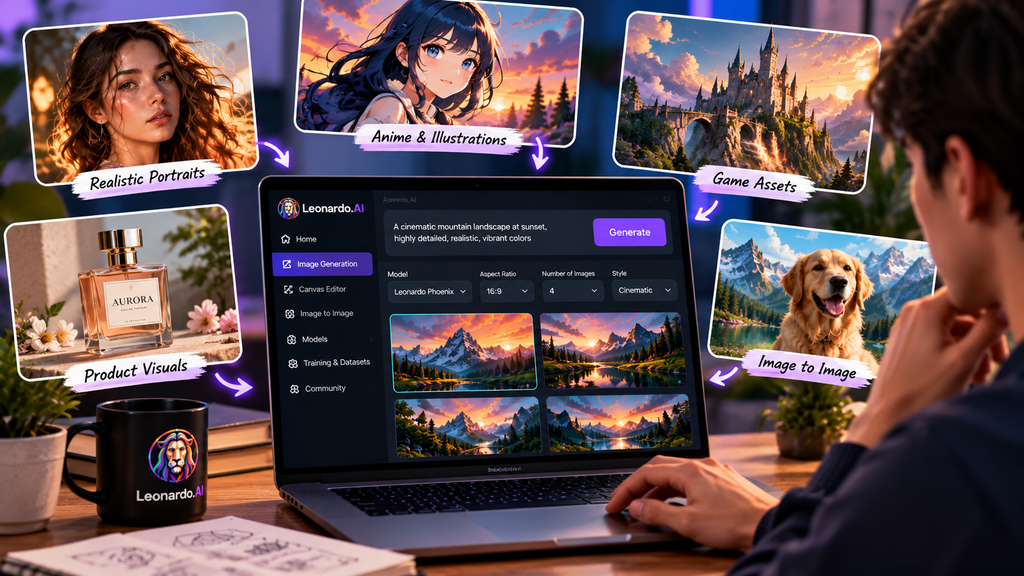
Leonardo also has the ability to generate images from images. Take a picture, a sketch or an existing work of art to use as a reference. This can be used to change the look of an image, create variations of an image, and/or to preserve parts of the image while changing other parts.
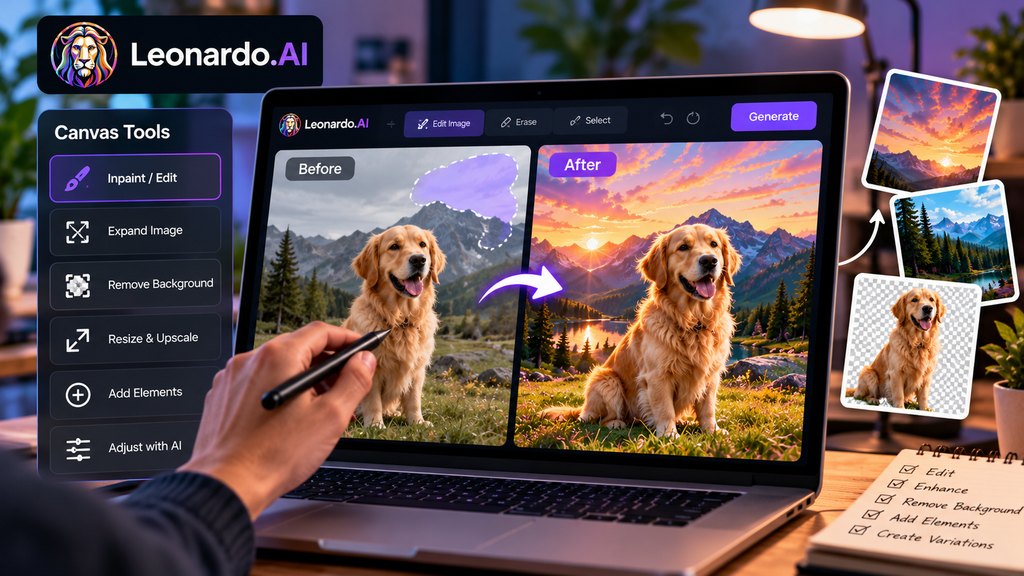
People that like to edit in a precise way can use the canvas editing in Leonardo. This will allow you to edit a specific part of an image, increase the size of the image’s edges, remove or modify parts of an image, and enhance details without starting from scratch.
Key Features of Leonardo AI
Multiple AI Image Models
In contrast to a single image generator, Leonardo AI has a wide range of image models. Its own Phoenix model is more geared towards accurate time and precision in text rendering, whereas other models are geared towards different visual styles and uses.
Why this is important is that you don’t generate images the same way everywhere. An anime character might be a good choice for a cartoon-like style that is not useful for photorealistic portraits or product visuals. Portraiture that is photorealistic may not be suitable for anime or game assets or graphic design. Leonardo provides users with the freedom to experiment.
Phoenix Image Model
Phoenix is the 1st Party model foundation from Leonardo. It has been designed according to the “Edit with AI” feature, which allows users to edit the text in the images and repeat the process, in addition to good prompt adherence and coherent text in images, says Leonardo.
On a practical level, Phoenix is most interesting to the users who would like to have greater control over the detailed prompts. Phoenix will be better suited to handle instructions like those for a poster that requires detailed wording, for an image that is product-oriented and has a clearly labeled component, or for a more complex image with several described elements.
Create and edit images using Canvas Tools
Leonardo AI is more than just a mere image maker. It comes with editing options that allow for bettering or altering the produced visuals.
The following are examples of applications that these tools can be used for:
- Repairing a section of an image, without re-generating the whole image.
- Adding texture to the outside of an image. Stretching the edge of an image.
- Removing backgrounds.
- Resizing images to higher dimensions. Enhancing images with higher dimensions.
- Using AI to make style or detail edits.
This allows Leonardo to be more useful for the actual creative process. For instance, a marketer might create a basic graphic and add or change the background, product placement, or composition.
Image to editor
Among Leonardo’s best skills is the creation based on references. An image can be uploaded, and the AI will be guided by this image if you want to have a specific style, composition, or subject.
This can be particularly beneficial for:
- Making variations of a character or product.
- Taking sketches and refining them to create a beautiful piece of art.
- Applying the same visual style to a number of images.
- Creating concept art from a rough reference.
But the answers from a reference are not always spot on, however. Platform reviews mention that there can be drift between generations in terms of faces, expressions, and the fine details, especially when there are more complex workflows.
Custom Models and LoRAs
With Leonardo, users can train their own models, as well as leverage LoRAs, small add-on models that teach the generator a specific style, character, object, or visual theme.
For instance, a brand could train a model to generate visuals in a uniform manner with regard to their product images.
Video tools and upscaling
Leonardo also has a Universal Upscaler to enhance the image resolution and the details of the image. It comes in handy if you want to use the images for print, for creating large graphics for social media or website images.
The platform also features tools for creating short videos and more creative options, but the emphasis of this review is on creating images. Leonardo is not just an image generator – it is an AI video generator as well. If you are looking for an image-only generator, it will serve you just as well.
Who will benefit from Leonardo AI?
While Leonardo AI is suitable for individuals who require more than a simple “type a prompt, get an image” service, it might not be the ideal choice for those needing complex task automation. It is particularly convenient for continuous creative work thanks to the generation, editing, reference, custom models, and upscaling features.
- Anyone developing ad campaigns and wishing to get an impression of their concept, product photos, banners and campaign artwork without having to wait for a designer to build it for them.
- Graphic designers who require a quick method of trying out various styles, layouts, color directions, and other visual aspects before they can add details, tweaking them manually.
- Individuals who are video game developers or concept artists and require characters, environments, props, storyboards, and concept art in the early development process.
- People who own and operate small businesses or are a founder and want to have smooth and neat graphics for their brand, product mockups, and marketing campaigns but cannot afford a designer for every idea.
Leonardo AI vs Alternatives
| Tool | Best for | Main difference |
| Leonardo AI | Flexible creative workflows, references, editing, custom models | Broad platform with many models and controls |
| Midjourney | Highly stylized artistic images | Often favored for distinctive artistic output, but less workflow-focused |
| Ideogram | Posters, typography, and text-heavy designs | Strong focus on readable text in images |
| Canva AI | Simple marketing and social-media design | Easier for general design, but less specialized for advanced image generation |
Worth the Hype or Just Another Image Generator?
LenardoAI is particularly beneficial for creators, marketers, designers, and small businesses thanks to its various models, Phoenix prompt controls, editing features, upscaling capabilities, and custom-model options.
The free plan is a good option to begin with. Test it out on some genuine projects before buying it. The paid plans are more worth it if you need more generations per day, higher quality settings, and commercial workflow features.
But Leonardo AI isn’t necessarily the best image generator for everybody. A lighter tool might be more appropriate if you have a need that is fairly simple and quick, with less learning. If you’re looking for highly stylized art, then Midjourney might be a better fit. For accuracy in text, Ideogram should be considered.
Conclusion
For bloggers, designers, and content creators looking to create and edit images without professional expertise, Leonardo AI is a great option. It is suitable for image generation, editing, and upscaling, due to its versatility. But there can be some players who crave results that do not come out the way they want; a learning curve and token limits can be frustrating.
My recommendation? Only upgrade the plan if it works for you; otherwise, stick with the free plan. For those seeking a single tool that provides creative freedom and offers some editing tools, consider Leonardo AI. While it may not be the top choice for generating images, Leonardo AI is a good option to consider if you’re seeking creative freedom and handy editing features within a single platform.
FAQs
1. Is Leonardo AI easy to use?
Yes, for simple images. Images can be generated by entering a prompt and selecting settings. Some of the more advanced features, like custom models, LoRAs, and canvas editing, will require more time to learn.
2. Can Leonardo AI generate text to pictures?
Yes. It renders coherent text in images, such as reasonably long strings of text and sentences, in its Phoenix model. Nevertheless, please read the output with great care before utilizing commercially.
3. Is it possible to use images generated by Leonardo AI commercially?
The terms and conditions for commercial use are subject to Leonardo’s current offerings and your plan. Always check the official licensing before employing generated images in client work, advertising or products.