As of 2026, there are a lot of AI tools available in the market for image generation. There are a lot of options out there that help people to create whatever they want in their desired way.
Some are ideal for realism, some are ideal for creative artwork, editing, typography, or for the professional design workflow. These differences are greater in 2026. If you’re looking for the best AI image-generation tools to know, here are five that stand out with their unique capabilities and applications.
The Shortlist at a Glance
| Tool | Best Suited To | Free Access | Standout Capability |
| Midjourney | Artistic and conceptual imagery | No | Distinctive visual style and creative control |
| GPT Images | Conversational iteration and quick edits | Yes (limited) | Natural-language refinement inside ChatGPT |
| Adobe Firefly | Photoshop and Creative Cloud workflows | Yes (limited) | Seamless integration with Adobe apps |
| Ideogram | Typography and text-in-image designs | Yes (25 images/day) | Best-in-class text rendering |
| Leonardo AI | Game assets, custom styles, and high-volume creation | Yes (150 tokens/day) | Multiple models + generous free tier |
The Real Difference Is in How You Work
The main difference that differentiates between different tools are:
- Quality of output is not consistent. While DALL-E 3 is undeniably a leader in the artistic and conceptual space, Midjourney is worth considering for the context of text generation, especially within images, where the AI is less adept than other tools such as Ideogram.
- It’s not all about the capability; it’s about workflow fit. For those who are already familiar with Photoshop, Firefly’s Generative Fill integration is a huge time saver. If you’re the lone creator trying out concepts, you can experiment with no upfront payments by utilizing Leonardo’s free tier and multi-model access.
- The availability of free vs. paid access is an important distinction. There is no free plan version of Midjourney, and all of the three free plans (Daily or Monthly) of Leonardo, Ideogram, and Firefly are usable
1. Midjourney: The Artistic image generator
Despite the many other options, Midjourney is still the preferred platform for artists and content creators who want a different style in their work
Midjourney is a text-to-image generator that creates highly stylized images. It works very well for conceptual art, mood boards, character designs, and imagery that requires a “human touch” and does not require photorealism.
Where It Stands Out
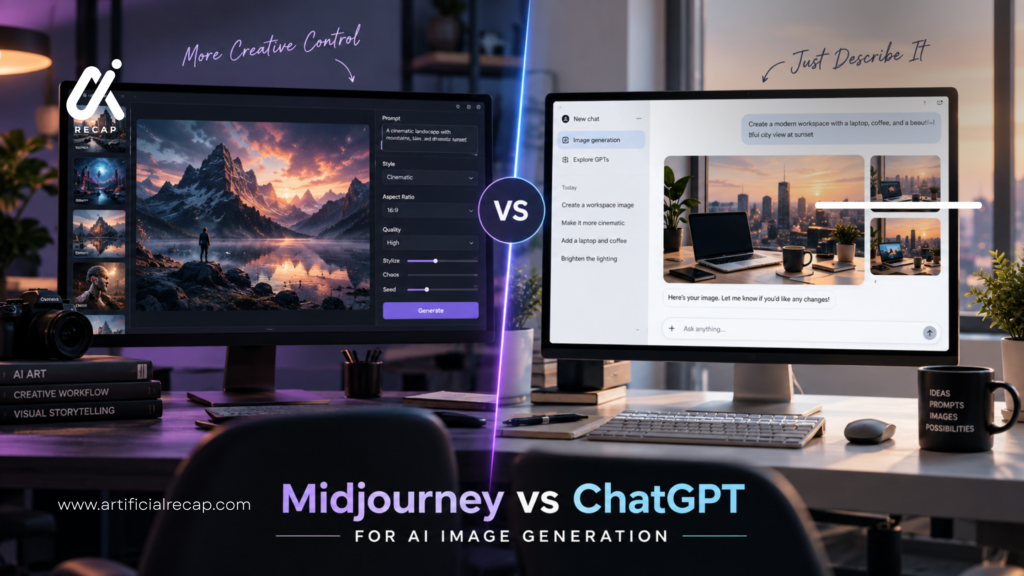
Midjourney’s V8.1 (default model since June 2026) is great at creating painterly images, which other tools don’t excel at. There is also a huge level of control with parameters such as –ar (aspect ratio), –s (stylization), –c (chaos), enabling more advanced users to fine-tune the outputs.
Features Worth Knowing
- Relax Mode: Standard plan and higher will have unlimited “relaxed” generations (slower but unlimited)
- Private generations (images won’t appear in the public gallery) are possible with Stealth Mode plans: Pro and Mega.
- Concurrent Jobs: higher tiers: 12+ simultaneous fast generations
- The Relax mode in Pro/Mega features SD video generation also.
2. GPT Images: The Conversational All-Rounder
OpenAI unveiled a shift in ChatGPT’s image generation capabilities from DALL-E 3 to GPT Image 2, moving away from image generation tools to a more conversational experience in 2026.
Images can be created within the ChatGPT conversation using GPT Image 2. Natural language can be used to go into more detail in the output, without having to recreate the prompt from the start.
Where It Stands Out
The most notable feature of GPT Image 2 is that it takes a conversational approach to workflows. Rather than creating, downloading, and reprompting in another application, you remain in the same conversation and edit images in a collaborative conversation.
Features Worth Knowing
- The free plan of ChatGPT only allows for limited image generations per day.
- GPT-3 Turbo offers approximately 10x the generation of the free version.
- ChatGPT Plus: During peak times, the service is prioritized and generates faster.
- Image quality control: Image quality control in low-light scenes comes with a standard image API, which is available to developers for per-image pricing
3. Adobe Firefly: The Creative Cloud Native
Adobe Firefly is generally made for those users who are already using Photoshop or any other Adobe Creative Cloud app.
Firefly creates images and gives AI editing tools like colour grading, further editing, and many more options that are available in the Adobe Creative Cloud app.
Where It Stands Out
Firefly is the most seamlessly integrated of all the CC products. Generative Fill in Photoshop allows you to pick a space and write the content you wish to be generated or deleted without the necessity of using another tool or downloading the content.
One of Adobe’s priorities is commercial safety, with Firefly being trained on licensed and public domain material, instead of off-the-web stuff.
Features Worth Knowing
- Generative Credits: Monthly plans have credits (2,000-50,000) that can be used for generating content.
- Standard Tier: Generates 25% less output (watermark) at a fixed price.Pro Tier: Generates 25% less output (watermark) for a fixed price.
- Firefly has access to Google, OpenAI, and Flux models in Partner Models (higher tiers).
- Video and Audio: Advanced features such as Firefly Video Model, sound effects, and translation are available on the premium plans.
4. Ideogram: The Text-in-Image Specialist
One issue most AI image generators don’t handle well is rendering readable text within an image that’s placed in an appropriate location. Ideogram is designed to overcome a challenge most AI image generators have – placing readable, appropriate text within an image.
Whether it’s the creation of an accurate and legible logo, poster, social media graphic, or typography-driven design, Ideogram can do it all.
Where It Stands Out
There is no other mainstream tool with a text rendering quality as good as Ideogram’s. Ideogram is consistently clean and readable in its typography, compared to Midjourney and GPT Image 2, which garble or misspell the text.
Features Worth Knowing
- Cost of Each Image: 10 cents per image (~$3.00 per day)
- P-Image Model: Rapid, inexpensive model (~0.003-0.015 per image at 1K resolution)
- Plus Plan: $8/month (12 months) for additional limits and private generations
- Business Plan: $42/month (annual) commercial license and priority generation
5. Leonardo AI: The Multi-Model Workhorse
Leonardo AI has combined various image models, an image canvas editor, upscaler, and video generation into a single platform, offering a free trial that includes unlimited usage of the main features.
Leonardo offers different models, such as FLUX.2 Pro, Phoenix, and custom-trained models for text-to-image, image-to-image, and image editing workflows.
Features Worth Knowing
- BİTYOU™ SLOPR™ Basic Public: 150 tokens/day, public images, basic features
- Custom Models: Up to 10 models/month on the Essential plan.
- In-browser editing with Inpainting, outpainting, and Layer Support using the Canvas Editor.
- This feature enables you to improve the resolution of images without changing to a different tool.
- Relaxed Generation: Premium & above – Unlimited relaxed generations.
Comparison Table
| AI Tool | Best Use | Free Access | Ease of Use | Standout Feature | Main Limitation |
| Midjourney | Artistic and conceptual imagery | No | Moderate (parameters required) | Distinctive visual style | No free tier; public by default on lower plans |
| GPT Images | Conversational iteration | Yes (limited) | Very easy | Natural-language refinement | Limited manual control; not specialized |
| Adobe Firefly | Creative Cloud workflows | Yes (limited) | Easy (in-app integration) | Photoshop and Illustrator integration | Credit system; less valuable outside Adobe ecosystem |
| Ideogram | Text-in-image designs | Yes (25/day) | Easy | Best-in-class text rendering | Narrower focus; no video generation |
| Leonardo AI | Multi-model experimentation | Yes (150 tokens/day) | Moderate (multiple settings) | Generous free tier + multiple models | Token system can be confusing; public free tier |
Before You Pick One
Before you sign up, consider the following questions:
- Are there any differences between the free and paid versions? You can use all three of them for free but with limited benefits: Leonardo, Ideogram, and Firefly. Test before paying.
- Are you interested in having private generations? Images are typically published on free tiers. Some client work may require the use of paid plans.
- Does it work for you? Firefly is ideal for Adobe users, Midjourney for artist types, and Ideogram for those who work with text.
- Will you have to use it often? A free tier or access to images included with ChatGPT may be enough for those who will only produce fewer than 50 images/month.
- Do you have a sensitive piece of information to deal with? Do not use free tiers that are open to the public or for clients.
- Are there any integrations that you would need? Photoshop users should give Firefly first preference, and ChatGPT users can give preference to GPT Images.
Conclusion
There is no one AI image generator that is the best for all situations; it depends on the image you want to create. While ChatGPT Images is a great tool to use when creating images for your chatbots, Midjourney is more artistic, Ideogram is better for designs with lots of text in them, and Firefly and Gemini are more of an AI and creative tool.
If these are used for the first time, select the tool most appropriate to the most common task. Try to experiment with the free offers available, make comparisons with oneself as to features or limitations, and only when the features or limitations of the subscription are of consequence to the work (when the subscription counts for the work) does one pay for the subscription.
FAQs
1. 2026 best AI image generator for art is which one?
While AI models like Midjourney can generate images across a variety of styles, their artistic and conceptual outputs continue to be their greatest strength, providing a unique visual style not found in other tools.
2. Which tool is the easiest for new ones?
ChatGPT’s GPT Image 2 is the easiest to use – it can be refined using natural language and contains no parameters or settings.
3. What’s the Best AI image generator for text in pictures?
Ideogram’s clear leader for well-placed text inside of an image (logos, posters, and social media graphics).
4. How accurate are images created by artificial intelligence (AI)?
There can be considerable variation in output from generation to generation. Don’t be surprised if you need to repeat this several times and carefully examine the results before employing it professionally.